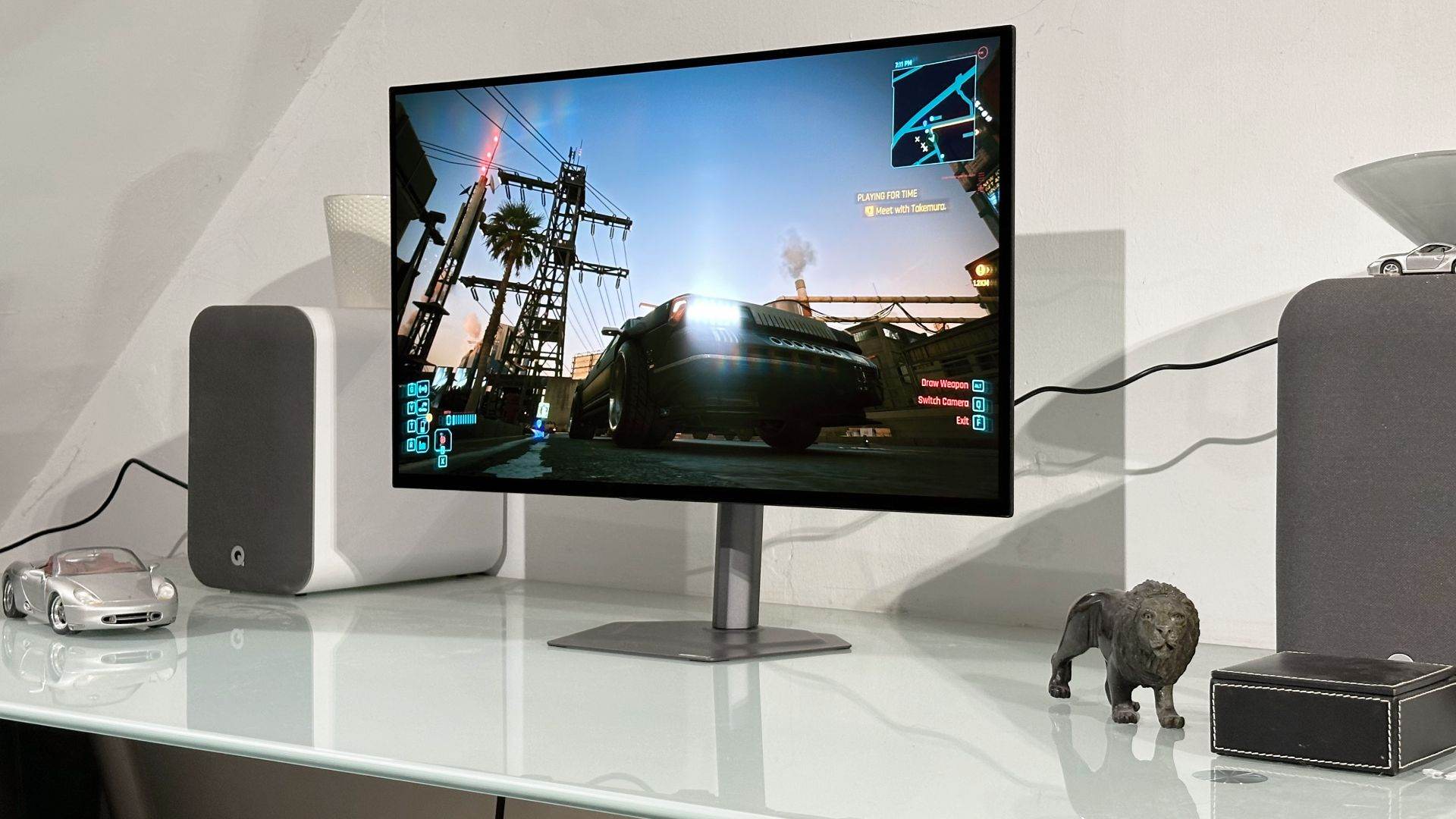
Specifications and review clarification — November 11, 2026. Gigabyte's GO27Q24G is a 27-inch, 2560 × 1440, 240 Hz WOLED gaming monitor. The original article called it almost identical to Gigabyte's costlier MO27Q28GR and made broad promises about its value and USB-C charging. This update distinguishes Gigabyte's specifications, PC Gamer's April 2026 reviewer impressions, and claims not independently tested by GameLogNews.
What are the Gigabyte GO27Q24G's confirmed specifications?
| Feature | Gigabyte GO27Q24G official rating |
|---|---|
| Display | 27-inch WOLED, glossy anti-reflection finish |
| Native resolution | 2560 × 1440 (QHD) |
| Maximum refresh | 240 Hz |
| Advertised gray-to-gray response | 0.03 ms |
| Typical full-screen SDR brightness | 275 cd/m², 100% APL |
| Typical peak HDR brightness | 1,300 cd/m², 1.5% APL |
| HDR certification | VESA DisplayHDR True Black 400 |
| Color-gamut claim | 99% DCI-P3 |
| Display inputs | Two HDMI 2.1, one DisplayPort 1.4 and one USB-C |
| Speakers | None |
| Stand adjustment | Height 130 mm, tilt, swivel and 90° pivot |
| Warranty | Three years, including panel burn-in subject to terms |
These numbers are quoted from Gigabyte's official GO27Q24G specification page. They are manufacturer-defined ratings, not measurements carried out by GameLogNews.
The GO27Q24G is not a 4K monitor. QHD reduces the number of pixels a graphics card must render compared with 4K, which can be useful for high-refresh esports titles. However, text and fine interface details will not be as dense as on a comparable 27-inch 4K panel.
How does it differ from the MO27Q28GR?
The premium MO27Q28GR uses a newer-generation WOLED panel rated by Gigabyte for 280 Hz, 335 cd/m² typical full-screen SDR, and 1,500 cd/m² HDR peak in a 1.5% window. It also carries DisplayHDR True Black 500, versus True Black 400 on the GO27Q24G.
The original GO27Q24G story said the cheaper model provides essentially the same experience. It is more accurate to say it preserves the core OLED contrast and a fast 240 Hz mode, while its panel is rated for lower full-screen brightness and a lower peak HDR level.
The difference between 1,300 and 1,500 nits concerns a tiny HDR test window, not the entire screen operating at those luminance levels. Likewise, the maximum refresh-rate difference is measurable on paper but not proof that every player will notice it in every game.
The $100 price gap discussed in PC Gamer's original April 13 review was a historical US price comparison: approximately $499 for the GO27Q24G against $599 for the MO27Q28GR. Current local pricing, stock and promotions can be different.
What did PC Gamer actually observe?
In the independent review, Jeremy Laird liked the cheaper monitor's sharp-looking OLED motion, glossy presentation and practical adjustable metal stand. However, the review also noted weaker brightness and a comparatively less satisfying image in bright HDR scenes than on the more expensive sibling.
Darker scenes could still look impressive because WOLED produces excellent dark levels. That did not erase the reviewer's observation that bright whites and intense scenes could appear less punchy. A display's apparent quality depends on how much of the screen is illuminated, not only its peak-highlight rating.
The published review ultimately leaned toward paying the extra $100 for the stronger-panel MO27Q28GR when the two were available at their cited launch-period prices. That is the reviewer's conclusion, not a recommendation based on an in-house GameLogNews test.
Can USB-C charge a gaming laptop?
Gigabyte's official specifications confirm the presence of a USB-C connector, but the main spec sheet does not clearly establish a guaranteed continuous charging wattage.
PC Gamer discussed USB-C charging in its review. The previous GameLogNews article went further, suggesting that power delivery would simplify charging almost any laptop. USB-C connectivity does not automatically mean a monitor can replace a laptop's dedicated high-wattage charger.
Before buying the display as a laptop companion, check the manual, current firmware documentation and the host's DisplayPort Alternate Mode compatibility. Even if limited Power Delivery is available, gaming notebooks often need substantially more power under load.
Also, unlike its pricier relative, the GO27Q24G is not advertised in the review as having the same USB-A hub. A display with USB-C video input is not necessarily a full docking station for peripherals.
Is the 0.03 ms claim a measured input lag?
No. Gigabyte lists 0.03 ms gray-to-gray pixel response time, which is a manufacturer specification for panel transitions. It is not the same as total input-to-display latency, nor proof that every possible color transition completes in precisely 0.03 ms under actual game conditions.
For competitive play, overall responsiveness also depends on refresh rate, GPU frame delivery, processing delay, variable refresh behavior and the chosen display mode. Independent measurements of those factors would be more useful than treating a single response-time rating as a guarantee of near-zero system latency.
A 240 Hz screen can show new frames at shorter intervals than a 60 Hz display if a connected system actually renders them. It still does not force a game running at 90 fps to produce 240 distinct frames per second.
What about OLED burn-in and desktop productivity?
The official product specification lists a three-year warranty that includes panel burn-in, subject to the applicable terms. It does not mean permanent static images can never affect the panel.
Users who leave application menus, taskbars, editors or status displays visible for long periods should review the monitor's protection options and warranty exclusions. The glossy panel may also be less convenient in bright rooms with direct reflections.
For gaming, QHD at 27 inches can feel like a useful compromise. For documents and coding, a higher-resolution display may provide sharper text. Users should decide based on their real workloads rather than assuming an OLED panel is the best option for every activity.
Quick answers
Is the GO27Q24G OLED? Yes, Gigabyte specifies WOLED.
What is the maximum refresh rate? 240 Hz, not 280 Hz.
Is the 1,300-nit HDR rating full-screen? No; it is for a 1.5% test window.
Does it include speakers? No.
Is it worth $100 less than the MO27Q28GR? That depends on current prices and whether lower HDR/full-screen brightness is acceptable. PC Gamer favored the pricier model at the April 2026 prices.
Bottom line: The GO27Q24G delivers QHD 240 Hz WOLED gaming with a useful stand and strong contrast, but its older panel and lower brightness are meaningful trade-offs. It should be judged against real current prices and independently observed results.
Sources: Gigabyte GO27Q24G specifications; PC Gamer independent GO27Q24G review; Gigabyte MO27Q28GR official specifications.
Source date: April 13, 2026